What is incorporation?
Incorporation is a legal process that proves the existence of a business entity independent of its founders. A corporation (company) is the resulting legal entity of incorporation to operate one or more activities for profit. Companies are allowed to enter into contracts, sue, own assets, and borrow money from financial institutions. Company registration leads to further expansion of business and gives executives and shareholders different powers. The life of the corporation does not depend on individuals. As long as it moves in the direction of its goals, the company can continue its activities without restrictions and even merge with other businesses.
When is a good time to incorporate a company?
Well, experience has shown that ultimately conditions determine the right time for incorporation. Since the circumstances are different for each business, founders must decide the time of incorporation that could be a turning point in the future of business. Imagine you have a personal business or a sole proprietorship in Japan; if you have a fixed annual income of 5-million-yen or more, incorporation can be a perfect option for tax saving.
Reasons for incorporation
5 Reasons for incorporation (company registration):
1). Liability
One of the most important benefits of company registration is limited liability. It is to protect shareholders’ personal assets and separate them from the business. The independence of the company from its managers and shareholders makes the company stable. For example, if someone sues the company and wins court, the personal assets of members will not be at risk. On the other hand, in the event of any financial problems, the responsibility of individuals varies according to the amount of their capital.
2). Tax-benefit
When you do business as a sole proprietor or freelancer, many of your expenses such as salaries to family members cannot be deducted. As a result, most of your earnings are subjected to income tax. In contrast, companies are taxed only on their profits and salaries are considered as expenses. Another tax advantage that company registration offers is to plan your personal tax. For example, you can arrange to receive some part of your money as salary and the rest as dividends. Generally, dividends tax is much lower than income tax. Make sure, you get advice from a professional accountant or tax advisor for this planning.
The following is some of the reasons why incorporation is important for Japanese to save tax:
| Method | Description |
|---|---|
| Salary income deduction | A personal business or sole proprietorship is not considered a legal entity. Thus, it will also be subject to the residential tax in Japan. Assume your business has an annual income of 8 million yen and you paid 2 million yen as salary to any of family members. In this case, the tax will be 1.88 million yen; however, if you incorporate a company, the salary deduction will be 2 million yen. So, the tax will be 1.26 million yen,which will save 620,000 yen annually. |
| Severance pay | There is no preferential treatment for retirement allowance If you are a sole proprietor, so if you receive an income of 20 million yen, you will be charged a tax of about 7 million yen. In the same situation for a corporation, the tax will be 360,000 yen (in the case of 30 years of service), which will save about 6.64 million yen. |
| consumption tax | For two years after the establishment of the corporation, Consumption tax is exempted. If the annual sales are 10 million yen for both years and the consumption tax is 8%, 1.6 million yen will be saved for two years. |
3). Creditability
Company registration increases social credibility. The credit you get from the incorporation builds the trust of financial institutions and investors, makes it easier to get loans, and creates stronger business relationships with vendors and suppliers. incorporation leads to more profitable negotiations and increases sales. Since people are looking for a job position in reputable companies, easy recruitment of human resources is another benefit of the company formation. Keep in mind that if your business is performing poorly, you will lose creditability.
4). Name protection
company formation allows you to protect your business name and brand. For example, if you incorporate a company in Cyprus, no one in Cyprus will be able to form a company with the same name. Some countries even go further and refuse to register a name that already taken by another business in a different jurisdiction. The sole proprietorship and general partnership offer no protection for the business name.
5). Easy to transfer
It is easy to sell or buy a business if it is a company. Since all assets, relationships, and contracts are under the name of business, transferring the share of the company to someone else will automatically transfer all of them. It is also good to know that your interests can be easily traded and transferred to another family member without hindrance while this process in another type of business can be time-consuming and costly. Considering things like easy stock transfers and limited liability, attracting new investors is less of a challenge.
Do you need company?
Incorporate your company if you personal business is growing fast.
List of countries to incorporate
Contact Us NOW!
Disadvantages of company registration
Despite the benefit of incorporation, there are a few disadvantages when you incorporate a local company:
1. It is important to know that the cost for setting up a company is higher than sole proprietorship; however, because of its benefits, a large number of people incorporate each year.
2. More regulation: running a company required to follow some principles and regulations. It is no longer your personal business, and you need to separate your personal income and expenses from the company. Using company money is not easy and should be spent for the company otherwise, it is considered as a loan that you take. You need to pay it back with its interest. You need to follow labour regulations even you pay the salary to your family members. Also, you are obligated for account bookkeeping and annual tax return for the company separate from your personal tax report.
3. Company registration often is time-consuming especially its namechecking process.
4. Not easy to close the company: You need to follow all steps of the closing procedure and make sure all liabilities have been settled.
Difference between incorporation and sole proprietorship
First, let’s take a look at the definition of sole proprietors:
A sole proprietorship is an unincorporated business owned by one person who pays personal income tax on profits earned from the business. The sole proprietorship is not a legal entity, and all profits and losses of the business are borne by the same person. With a sole proprietorship business, you are liable for all debts and liabilities of your business while the company's assets, liabilities, debts, and income are separated from the owners and founders. The corporate's profits and losses are allotted based on the percentages of the shares each member hold.
The allowable costs for trade are limited for sole proprietors because the boundary between business and household is not clear. On the other hand, for corporations, it is assumed that all costs are for the company and in favour of the shareholders, so the range of costs expands and includes homes and offices, automobiles, life insurance premiums, retirement allowances, etc.
In sole proprietorships, Health insurance and welfare pension are available if at least 5 people are employed in the business, but when incorporated, it is compulsory regardless of the number of employees.
In a sole proprietorship, decisions are quick and easy and do not require the approval of others but raising capital is a bit complicated. Financial institutions and investors may require your business to be incorporated before they give you a loan or make an investment. Whereas the credit you get by incorporation can make it easier to raise capital and thus accelerate progress. While company registration offers name and brand protection, the sole proprietorship and general partnership offer no protection for the business name. In a sole proprietorship transferring the business is not as easy as incorporation. Another issue with a sole proprietorship is when you sell your business, you can sell your assets and goodwill; however, any gains will be included in your personal tax return and in most countries, there is no capital gain exemption. Another difference is how tax calculated which we have already mentioned in the tax benefit section.
Now you know that incorporation has many advantages.
Let’s read the rest of the article. We show you what types of company exist, where you can establish your company, how to do company registration, and how to enjoy tax benefits.
NOTE: Some countries offer tax-free (offshore) company registration. Please look at our article, 11 reasons for offshore company formation for more information.
Types of incorporation
Requirements and regulations for business structures are regulated by each country. Some jurisdictions allow certain types of corporations, and many have different rules and restrictions for company registration there.As your company grows and your structural and financial needs change, you may need to change the type of business in which you are classified. So, you need to know what types of corporations and entities are suitable for you. In general, there are a few types of companies in the world that we explain a few of them here:
C corporations
In the USA, C corporation is the most general form of company. C corporations have certain tax benefits, the main one being that the company's profit is independent of the tax owners' profit. It means company pay tax in its profit and owners pay their tax separately for any amount they received as salary, divided, and so on. Unlike the S Corps, C corporations can have any number of shareholders in any field. This means that C shareholders can also be employees of the company. It is important to know that C corporation must have a board of directors. The board acts as the company's decision-maker, while the shareholders act more as financial backers. If you like the company's revenue to stay in your business for future investment, or if you plan to expand your business and eventually sell it, a C corporation can be a great option. The ability to have several shareholders, even shareholders in other companies, leads to the growth of the C Corporation. Just keep in mind: you will probably have to pay for consultants, especially when it comes to taxes.
S corporations
In the USA you have an option to file your company as an S corporation. An S corporation does not pay taxes directly. Instead, owners report the company's revenue and losses as personal income and losses. S corporation is a business entity that transfers almost all of its finances to its shareholders. These financial resources include income and losses as well as tax deductions and credits. With an S corporation, profits are transferred directly to S Corp shareholders, meaning that shareholders are responsible for income, loss and taxes. This allows the S corporations to avoid corporate taxes, as shareholders are taxed on a personal level when they report it on their income tax return. To obtain S corporation status the company has to meet certain criteria. These requirements include:
- Being a domestic company (incorporated inside the USA).
- Shareholders should be residents of the USA and are limited to 100 or less.
- Shareholders should be individuals or tax-exempt organizations.
- Company should register only one class of stock.
This can limit shareholders and generally suitable for small companies, but still, allow you to benefit from lower corporate taxes in many cases. S corporation is structured in such a way that provides loopholes that allow shareholders to evade taxes. For example, a company S can claim that employees' salaries are distributed and avoid taxes.
Limited liability Company (LLC)
If you are living in Japan, it is like Godo Kaisha (GK). A limited liability company (LLC) protects members against financial liability. More specifically, an LLC protects the owners' assets in the event of a complaint or any financial loss. Unlike C Corporation, no board is required for LLC. An LLC can have a board of almost any structure it chooses, meaning it can mimic an equal partnership. LLCs include additional benefits, including simpler corporate financial structures, personal-level taxation (not corporate-level), and the ability to own multiple pieces of real estate under different LLCs to limit taxes. For those who do not intend to go public, LLC can be a great way to improve your professional appearance and gain special legal and tax benefits. The good thing about LLC (Godo) in Japan is that you do not need publish your financial statement.
Limited Liability Partnership (LLP)
An LLP is designed to bridge the gap between a traditional partnership and a limited private company. Some people also refer to LLP as a limited liability company, although this is not entirely true because partnership and company are two completely different entities. The LLP is registered under a name provided by the partners. One of the main advantages of registering a partnership as an LLP is that one partner is not responsible for the negligence or mistreatment of the other partners. LLP ownership can be easily transferred to another person. There is no limit to the number of times the partnership is transferred to different partners.
Limited Company (Ltd)
Japanese known this type of company as Kabushiki Kaisha (KK). A limited company is a private company whose owners are legally liable for their debts only to the extent of the money they have invested. This makes the company a separate entity. This means that your assets are more protected. A limited company structure is good for flexibility in determining shareholders, employing staff, and can be tax effective. As a limited company, you must choose your business as a separate legal entity, distinct from yourself and other shareholders and directors. The shares of a limited company are normally sold to close friends and others, and this is done only with the agreement of all shareholders.
Public Limited Company (PLC)
A PLC is a legal entity that exists even after the death, retirement, or departure of the company's shareholders. A public limited company gives limited liability to the owners and managers of a company. It is a bit more difficult to start a PLC because you need at least three directors and seven shareholders or members to get a founding certificate. The regulatory requirements for the PLC are stricter than for other partnerships or companies. The shares of a public limited company can be transferred freely on the stock exchange to anyone and raise capital by offering shares to the public. While a limited liability company thinks of more profit from this business, a public limited company considers less profit in terms of services and public goods. Since, the public limited companies are usually big companies that provide broader services to the public, their success and failure has direct or indirect impact on people.
Set Up Your Tax-Free Company Without Leaving Your Seat
Invest your fund in your business to grow and pay tax later when you are ready!!!
List of countries to incorporate
Contact Us NOW!
How to Incorporate Your company?
The company registration process varies among countries. each country has its own regulation and process; however, most of the steps are similar in all countries. For example, company formation in Japan is not that much difficult as long as you can prepare the required documents and follow the steps. The following are the normal procedure:
- Choose a proper name for your company:
Try to follow the rules when you selecting your company's name. Make sure there is no company with a similar name in your area and other places. select an easy-to-understand name that can be remembered easily. Make sure the domain name you want for your company is available. - Choose a location for your company (business address):
The location of your company is a place you would like to operate your business. It can be a dedicated place for business or your home. - Determine the business activity:
The purpose of the business should be clear and concrete. Make sure to put your future business activities you like to do. In this case, you do not need to change the article of incorporation later. - Determine the capital of the company:
The minimum required capital is 1 yen in Japan; however, it is better to have some capital if you intend to look for financing the company. - Who are the founders
- Prepare the seals
- You should decide the business year:
you need to determine from which date to which date will be your one business year. - Having a website is recommended.
- Preparing and certifying the Articles of Incorporation.
- Register the company:
You can submit the forms and documents to the Legal Affairs Bureau in person, mail, or online. incorporation normally takes one week after you submit the documents. but the corporation date will be the date you submit the documents. - Submit a notification to the tax office, labour standards inspection office, prefectures, and etc.
If you are not comfortable doing it by yourself, we suggest you seek advice from a professional in your area. they can assist you to establish your company.
Now see how you can establish a company overseas:
Most countries allow you to incorporate a company by yourself you just need to travel to that country or establish a company online if applicable.
But it not easy to travel, find a business address, fill out the form and then register the company, it required time and money. In addition, like Japan, most of the countries accept the documents in their own language. For example, incorporating a company in Cyprus required you to submit documents in the Greek language.
So, how can you do it in a more cost-efficient way?
Well, it is easy, through a registered agent. You just need to submit the basic document such as :
- A copy of your identity (copy of passport).
- A copy of proof of address (any bill under your name).
- Three preferred names for your company, and,
- Your company's business activities.
The rest of the job will be handled by registered agents, and they prepare all the necessary documents and forms. The cost of incorporation is even cheaper than incorporation in Japan. In most cases is below 2000 USD.
Keep in mind that in most countries a company must have its registered office in the country of registration (the registered office is the main address that the company may be contacted). This service is provided by corporate services providers and included in the corporation fee.

Here is the list of countries you can incorporate your company while staying at your home:

Japan company
The Kabushiki Kaisha (KK) is the most common form of company that can be incorporated in Japan.
Personal visit is not required.
Incorporation fee: EUR 1,800 (~ ¥ 240,000)

Cyprus company
The process of establishing a Cyprus company became very easy and fast. In addition, Cyprus companies have high reliability and accessibility in EU area. We also have a strong relationship with banks in Cyprus.
Personal visit is not required.
Incorporation fee: EUR 1700.00
Courier fee: EUR 70
Order NowRead More

Belize company

Seychelles company
- No taxes apart from an annual government license fee.
- No required financial reports and annual returns.
- Incorporate with only one director and one shareholder.
- Nominees are accepted.
- Company can be managed offshore.
- Foreign bank accounts can easily be opened, etc...
Personal visit is not required.
Incorporation fee: EUR 899.00
Courier fee: EUR 70
Order NowRead More

Delaware company
- No taxes apart from an annual government license fee.
- No required financial reports and annual returns.
- Incorporate with only one director and one shareholder.
- Nominees are accepted.
- Company can be managed offshore.
Personal visit is not required.
Incorporation fee: EUR 999.00
Courier fee: EUR 70
Order NowRead More

British Virgin Island (BVI) company
- No taxes apart from an annual government license fee.
- No required financial reports and annual returns.
- Incorporate with only one director and one shareholder.
- Nominees are accepted.
- Company can be managed offshore.
Personal visit is not required.
Incorporation fee: EUR 1950.00
Courier fee: EUR 70
Order NowRead More

Malta company
Malta Company has many advantages and executive features and has become a very popular location for foreign investors and businesses on an international level. Malta has Double Tax Treaty Agreements with over 70 countries, and the procedure of incorporation is easy and fast. 100% foreign ownership is allowed. Additionally, there are valuable advantages of the tax system in Malta. Malta tax rate can be decreased to %5, which is the lowest in the EU area. Since Malta is one of the members of the European Union, effective tax handling can be done.
Personal visit is not required.
Incorporation fee: EUR 3400.00
Courier fee: EUR 70
Order NowRead More
Why oobac
WHY
work with OOBAC
?
We have been in this business for more than 20 years.
We have successfully opened more than 5,000 company.
We find the most suitable jurisdictions for your needs.
We will assist you to get your corporate bank account.
We provide free consultation via email, Skype, Line, and phone.
How to minimize your tax?
Before we talk about how to minimize tax in other countries, let’s look at the income tax each individual needs to pay in Japan. The following table shows the income tax rate in Japan:
| Taxable income amount | Tax rate |
|---|---|
| 1.95 million yen or less | 5% |
| 1.95 million yen to 3.3 million yen | 10% |
| 3.3 million yen to 6.95 million yen | 20% |
| 6.95 million yen-9 million yen | 23% |
| 9 million yen to 18 million yen | 33% |
| 18 to 40 million yen | %40 |
| 40 million yen ~ | 45% |
In case of sole proprietorship, resident tax, consumption tax, and individual business tax are other taxes that must be paid.
Corporate tax is levied on corporate income and applied only on profit. It is lower and more uniform compared to income tax. Corporate inhabitant tax, corporate business tax, local corporation special tax, consumption tax and property tax are other taxes that corporations must pay.
The following chart compare corporate tax in different countries:
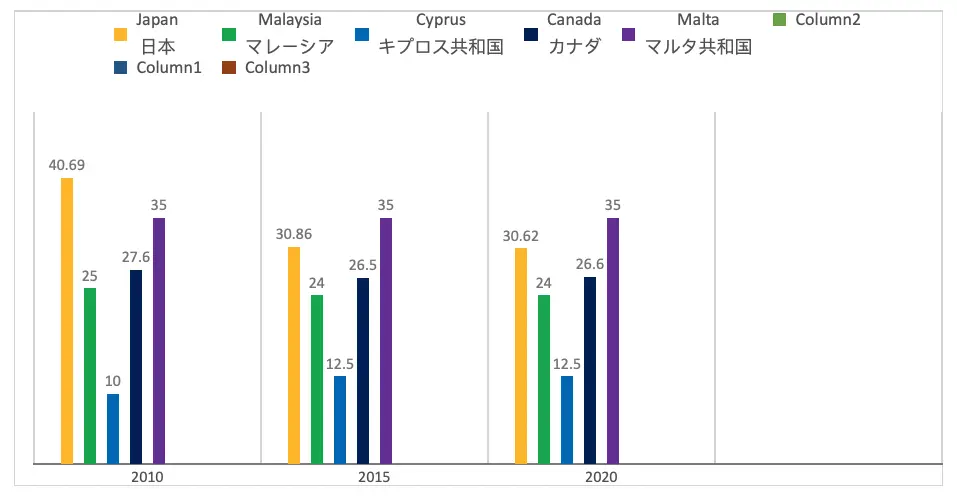
Here, we have some tips on reducing corporate taxes. It is important to know that tax laws vary from country to country, but following these tips in all countries will have a positive impact on corporate taxation:
1. Add a low-income spouse as a shareholder
Add a low-income spouse as a shareholder will help to reduce the tax. For example, in Canada the company owner's spouse can receive a maximum of $ 40,000 in tax-free profits per year. In general, lower income you have the lower tax rate you pay, so separating income into two lower incomes will eventually reduce your tax burden.
2. Promote your business and get tax deductions
Advertising costs are deducted in full, and purchases made for gifts to give to customers are also fully deductible. Eventually, meals and entertainment for winning customers and dining clients, are reduced by fifty percent in Canada.
3. Charitable tax donations
One way to reduce business taxes in many countries is to be involved in social needs. Companies that donate to registered charities can write down the entire amount of the donation as a cost as long as the company is profitable. Some countries even have some preferred tax options for those who supports non-profit organizations.
4. Design the business structure
Not all business structures are equal. Before deciding for company registration, research all the options to determine which one will work best for your business. Determine who are going to be the shareholders and how the profit supposed to be distributed. The combination of local and foreign companies works very well together in some countries.
5. Have accurate records and information about deductions
Keeping a very accurate record and knowing the possible deductions can help you reduce taxes and avoid tax audits. There are several tax deductions that you may not be aware of. It is important to thoroughly research the fractions and keep track of everything. A little knowledge and accurate accounting can go a long way in reducing your tax debt. Always get advice from your tax advisor or accountant.
6. Pay for some expenses
I know it looks crazy, but some people do that. For example, some companies pay for their employees’ kids' education or accommodate a place for their managers or staff. As an owner of a company transferring some of those expenses into the company will save some taxes on the company!
General FAQ
Reasons for incorporation?
(1) Liability, (2)Tax-benefit, (3) Creditability, (4) Name protection, (5) Easy to transfer
Types of incorporation?
C corporation, S corporation, Limited liability Company (LLC), Limited Liability Partnership (LLP), Limited Company (Ltd), Public Limited Company (PLC)
References
[1] Hayes, A. (2020, September). Incorporation.[2] Entrepreneur. How and Why to Incorporate your Business.
[3] Corporate Finance Institute. What is a Corporation?
[4] Soma, I. (November, 2016). What is incorporation? Explain the meaning, benefits, procedures, costs, etc.!
[5] Harvey, L. (October, 2015). How to Change From a Sole Proprietorship to a Corporation
[6] Automatically lighten management. What are the advantages and disadvantages of being incorporated by a sole proprietor?
[7] Onoe, K. (November, 2020). What is incorporation / corporation formation? What does it mean to become a corporation from a sole proprietor?
[8] Nelson, N. Comparing Company Types.
[9] Ownr. Sole Proprietorship vs Corporation: How to choose.
[10] Hayes, A. (July, 2020). Ltd. (Limited).
[11] Hargrave, M. (March, 2021). Public Limited Company (PLC).
[12] The formations company. LLP vs Ltd: What’s the difference?
[13] Feigenbaum, E. (February, 2019). Limited Liability Partnership vs. Limited Liability Company.
[14] Credictionary. (March, 2021). When is the sole proprietor incorporated? Introducing advantages and disadvantages.
[15] Credictionary. (March, 2021). What is a sole proprietor? Explains the advantages and disadvantages of sole proprietors
[16] Sherman, F. (August, 2020). What Is the Difference Between Proprietorship & Incorporation?
[17] Legal ways to reduce business taxes in Canada.
[18] All tax rate numbers
[19] (April, 2019). You can see all the advantages and disadvantages of incorporating a private business!
[20] What is company registration (corporate registration)? Explain the basic knowledge from application procedure to change.
[21] Will you set up a company or be a sole proprietor? What are the advantages and disadvantages?
[22] Zinn, D. (January, 2020). S Corp vs C Corp: What’s the Difference?
[23] Huston, H. (September, 2020). Compare S corporation vs C Corporation.
[24] Thompson, M. How to Incorporate a Sole Proprietorship.
[25] Gregory, A. (November, 2019). How to Incorporate Your Small Business in 7 Steps.
[26] Gary, G. (April, 2021). How to incorporate a company: a guide.